Traditional QR Codes contain a URL that points to an online experience of some kind, such as more information about the product, promotions, usage ideas and more. Now you can upgrade form a traditional QR Code to a QR Code Powered by GS1 (so it can also scan at checkouts) by adding the same GS1 Global Trade Item Number® (GTIN®) that is used in traditional linear barcode graphics.
This article assumes that a product is carrying a QR Code with GS1 Digital Link URI syntax. The example below for instance, has a QR code, with the following Digital Link encoded into the graphic: https://id.dalgiardino.com/01/0956000134352
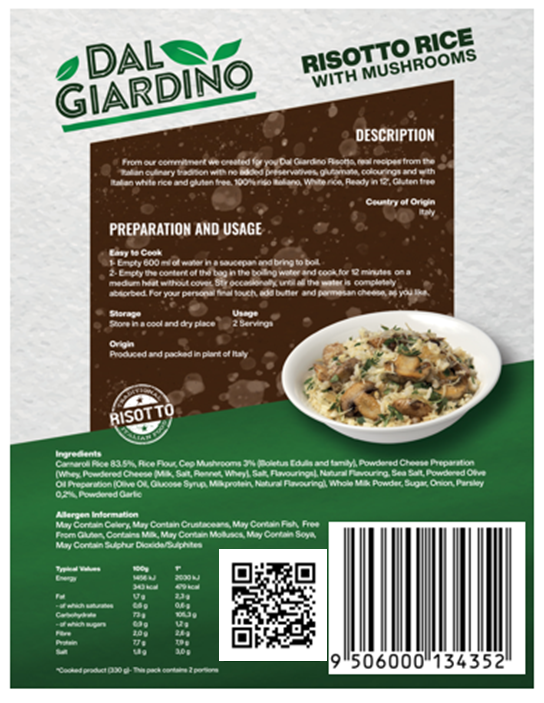
Advice about applying a QR Code powered by GS1 to a product emphasises that the barcode contains information that identifies the product, just like any other GS1 barcode. The identity of the product should be distinct from the location of any information about the product and where consumers are ultimately being sent when scanning labels.
You should always redirect from the GS1 Digital Link URI that identifies the product to the location of one or more pieces of relevant information.
How do you do that?
Redirection is very common online, but users may be unaware of this process. There are lots of ways to set up redirection ranging from the simple to the sophisticated. The methods below start from “no technical knowledge needed ” through to “specialist knowledge required”.
The redirect is not just a technical process, it’s also an organisational one. Think of the QR Code powered by GS1 as a barcode in the traditional sense. It contains the product identifier and so should be managed by whoever is responsible for barcoding today. The redirect is how that function is handed over to whoever is responsible for delivering information to consumers and business partners. This will require coordination and communication between departments and colleagues.
Can GS1NZ setup Redirection for me instead?
Yes, if you are a Member of GS1NZ, you can select the 'GS1 Resolver' option when when setting up your Digital Link online against your product in MyGS1, then you can simply input the final product information page for the redirect. If you would like to manage redirection yourself, please find more information below on this.
Option #1: Work with a Solution Provider
The content of the QR Code will be a GS1 Digital Link URI. This contains the GS1 identifiers that can be scanned and used without any online lookup, for example, at point-of-sale. The barcode is also the entry point for the digital content associated with the entity (e.g., product, location, asset, etc.) One method to set up redirection would be to work with a solution provider who already offers a marketing analytics platform (they’ll probably offer it as their “dynamic QR solution”, “digital identity solution” or similar). Encourage them to follow our best practice guidance of establishing the GS1 Digital Link URIs on your own domain name rather than theirs.
Filter GS1NZ solution providers here.
Option #2: Set up redirects in e-Commerce Platforms
Redirection is such a basic function on the Web that e-commerce platforms all support it one way or another. This is standard practice when information is moved around a website to avoid broken links and the all-too familiar “404 Not Found” error message. However, be aware that the documentation about how to do it will be written to satisfy the use case of moving a product page from one URL to another rather than an explanation of how to set up redirects when using QR Codes powered by GS1 or GS1 Digital Link.
The best advice is simply to search for “{your e-commerce platform} set up URL redirect” and follow the instructions. Depending on the platform you’re using this might be something you can do through your administrator’s interface or you may need to install a plug-in. Either way, the tooling exists to make this as simple as possible. N.B. e-Commerce platforms will only allow you to set up redirects within that platform. You won’t be able to redirect to a different internet domain.
Option #3: Set up redirects in Cloud Computing Environments
If your website and, perhaps, wider IT infrastructure is hosted on a cloud service then it will be easy for your IT manager to set up redirects. Indeed, it should be easy to follow our best practice advice to establish a subdomain of your own internet domain name and to redirect from there so as not to interfere in any way with your primary website. This can almost certainly be done using patternbased rules that cover any number of identifiers.
For example, you might redirect
id.example.com/01/(\d{14}) to example.com/ product?gtin=$1
Where “$1” is whatever the GTIN was in the original URL.
Option #4: Ask your webmaster
If you have your own website, the person who runs that website should be able to set up redirects easily.
The key thing to bear in mind is that, because of redirection, the QR Code powered by GS1 is logically separated from the structure of your website.
No one should rearrange their website to match the GS1 Digital Link structure. If you include a batch/lot identifier and/or a serial number in your QR Code, that does not mean you have to create extra pages on your website. Instead, you set up redirects based on patterns so that one rule can be used for all batches and all serial numbers of a given GTIN, one rule for all GLNs for a given prefix and so on.
Please note
Redirects on the Web can be permanent, that is, “this document has moved to this new URL so you can forget the old one” or they can be temporary, that is, “the thing you asked for is currently at this other URL which may change in future”. At a technical level, these are distinguished by using different HTTP response codes. It may be expected that the redirect will change over time, for things like promotions, website refreshes etc., when redirecting a GS1 Digital Link URI, we recommend using the temporary redirect code 303.
*1 - The kwz.me URL shortener is unusual in that it does not gather any data about its users. It is run by a private individual specifically as a privacy-preserving URL shortener and is used purely as an example in this document. It is not suitable for use in production-grade systems
Tech notes for webmasters
If you’re using an Apache or NGINX server, you can set rules in a .htaccess file as follows. These examples all assume the .htaccess file is in the server root but you can adapt them and put the .htaccess file anywhere in the path.
# A simple redirect from GTIN 09506000134369 to a page on dalgiardino.com
redirect 303 /01/09506000134369
https://dalgiardino.com/extra-virgin-olive-oil/
# the same redirect for the same GTIN but this time with or without extra information such as a batch/lot number, any query string etc
RewriteEngine on
RewriteRule ^01\/09506000134369
https://dalgiardino.com/extra-virgin-olive-oil/[L,R=303]
# A redirect for any GTIN to example.com with the GTIN and batch passed to the target URL’s query string
RewriteEngine on
RewriteRule ^01\/(\d{14})\/10\/(.*) https://example.com/
catalogue?gtin=$1&batch=$2[L,R=303]
Further reading
This document is complemented by the following:
https://ref.gs1.org/docs/2023/QR-Code_powered-by-GS1-best-practices (essential high-level advice on how to create a QR Code powered by GS1).
https://ref.gs1.org/docs/2024/digital-link-quick-start-guide (aimed more at technical staff integrating GS1 Digital Link and their websites; a direct complement to this document).
https://ref.gs1.org/docs/2024/connecting-barcodes-to-related-information (advice on how a single barcode can be liked to multiple sources of information thus reducing or eliminating the need for multiple barcodes on a single item).
https://ref.gs1.org/guidelines/2d-in-retail (detailed advice for retailers, brands and solution providers on the use of GS1 2D barcodes in retail).